Hey Elementors,
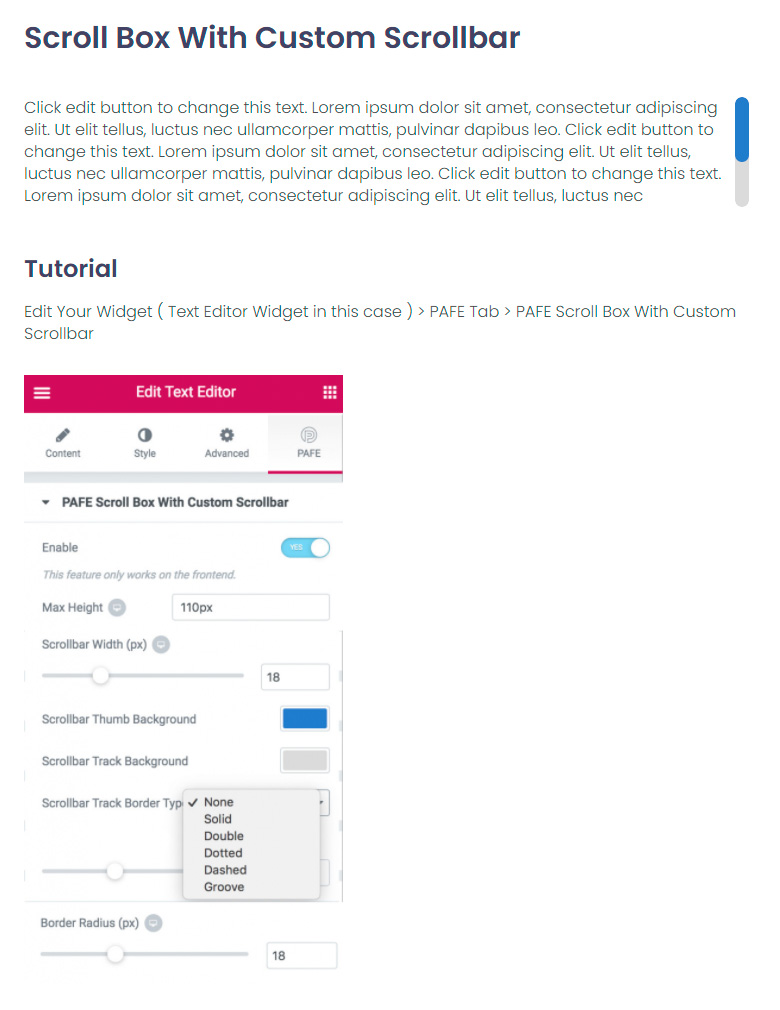
a scroll box is a fixed-height box with its own scrollbar – useful for long terms, changelogs or lists that shouldn’t take over the whole page. In Elementor you’d normally need custom CSS for this.
Here’s the addon that makes it easy.
... solution for Scroll Box Widget
An Scroll box is a box that grows scroll bars when it’s contents are too large to fit in the box. How do you make the box in Elementor? It`s possible with custom CSS or you are using Piotnet Addons. So you don’t need to worry about the technical details and you can change the size of the scroll box, color etc … just with a single click.
A scroll box is a small but handy tool. Use it for secondary content – important information should never be hidden in a box that visitors might not scroll.
My tip: give the box a clear height and a visible scrollbar, so visitors notice there’s more content.
Element Pack ⁵Demo1 Demo2 Demo3 Demo4 Demo5
Livemesh Addons ²Demo1 Demo2
HappyAddons ²Demo1 Demo2
PowerPack ²Demo1 Demo2
Ultimate Addons
Essential Addons
HT Mega ³Demo1 Demo2 Demo3
ElementsKit
Piotnet Addons
The Plus ²Demo1 Demo2
Crocoblock
Unlimited Elements ²Demo1 Demo2
Essential Addons
Element Pack
HT Mega
ElementsKit
WooLentor ²Demo1 Demo2
Essential Addons
HT Mega ³Lightbox Modal Notification
Dynamic.ooo ²Demo1 Demo2
HappyAddons ²Demo1 Demo2
Piotnet Addons
ElementsKit
Unlimited Elements
Essential Addons
The Plus ²Piechart Progress_Bar
HappyAddons
HT Mega
Element Pack ²Progress_Bar Progress_Pie
Livemesh Addons
Piotnet Addons